What you'll get
- A clear rule that tells every agent which decisions it makes alone and which ones come to you.
- One screen on your computer with each agent's bottom line, never its full report.
- Ready answer buttons with the agent's recommendation. One click and the answer goes back to the agent.
Write the rule: who decides what
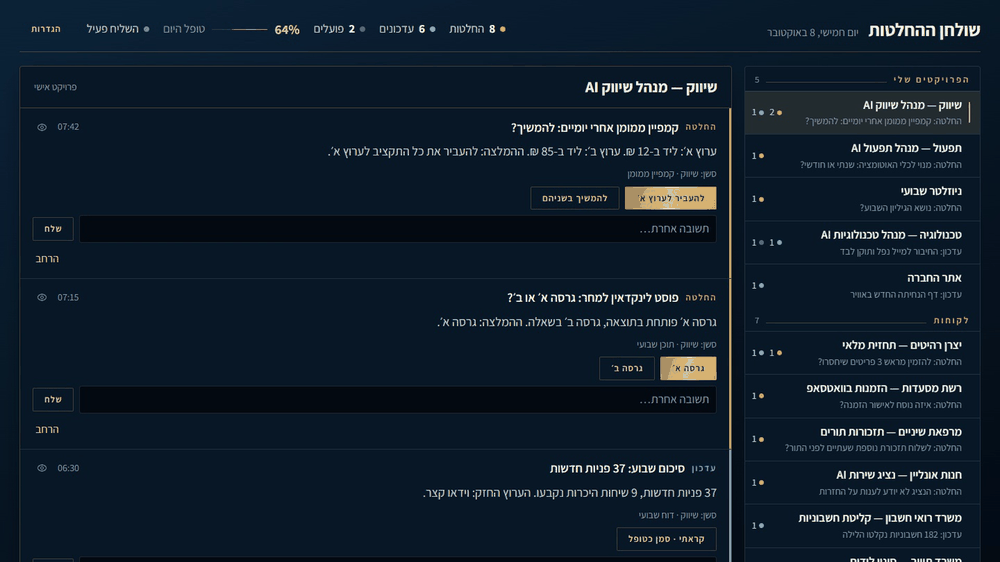
This is the real secret, before any screen: full autonomy for the agents, within clear guidelines. Obvious decisions they make alone. Only the strategic and business decisions come to you: money, positioning, risk. Claude Code reads a file called CLAUDE.md (standing instructions) at the start of every session, so the rule goes there once.
- 1. Open Claude Code in any project.
- 2. Paste the message below. Change the three lists to fit your business.
- 3. Read the file it writes and fix anything that's wrong.
Check it worked: It worked if, in a new session in another project, you ask "What are your decision rules?" and it answers with money, positioning and risk.
NoteNot sure where a decision belongs? Ask one question: can it be undone tomorrow at no cost? If yes, the agent decides. If no, it comes to you.
Add these rules to my personal CLAUDE.md, the one that applies to all my projects:

## Decision rules
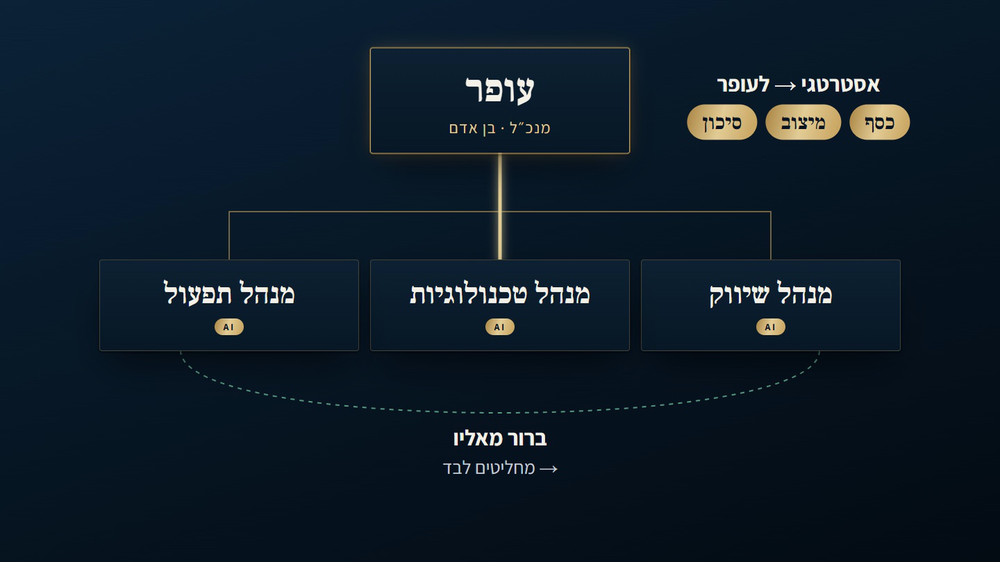
A decision with an obvious answer (from the data, from this project's rules, or the recommended option costs nothing and can be undone): decide it yourself, do it, and add one line to decisions-log.md in the project folder: what you decided and why.
Only strategic and business decisions come to me:
- Money: any spend, budget, subscription or purchase.
- Positioning: the offer, prices, the message to the market, anything said to a client in my name.
- Risk: legal, reputation, deleting data, a promise to a third party.
When there is such a decision, don't stop in the middle. Do all the work that doesn't depend on my answer, then end your turn with exactly this block:
⚖️ Decision needed
<one sentence: what to decide and why now, with exact numbers>
Options:
1. <your recommendation> (recommended)
2. <another option>Build one screen for all agents
Claude Code saves every session as a file on your computer. The screen reads those files and shows only the bottom line of each one.
- 1. Make a new empty folder for the desk and open Claude Code in it.
- 2. Paste the message below and approve its commands.
- 3. Open the link it gives you. The page runs only on your computer.
Check it worked: It worked if your projects appear on the right, and each one shows a short line instead of the agent's full message.
NoteThe page is empty? Work in at least one project first, so there is a recent session to show. Then ask Claude Code: "Check that you found the folder where Claude Code saves its sessions." The desk stopped showing items after a Claude Code update? The session files changed, so ask Claude Code to fix how the desk reads them.

Build me a "decision desk" in this folder: a local web page that runs only on my computer (127.0.0.1).
1. Claude Code saves every session as a file on this computer. Find where, and every 15 seconds read the sessions that were active in the last 3 days.
2. Sort each session by the agent's last message: "decision" if it ends with the "⚖️ Decision needed" block or a question to me, "update" if not, "running" if the agent is still working.
3. For each item write a bottom line of up to 25 words: what happened and what is waiting for me. Use a small, cheap model and save each summary so you never summarize the same message twice.
4. On the right, a list of projects (the folder name) with the number of decisions and updates in each. On the left, the items of the selected project, decisions first.
5. An "Expand" button that adds one or two more sentences. Never the full report.
Start it and give me the link.Add answer buttons that reach the agent
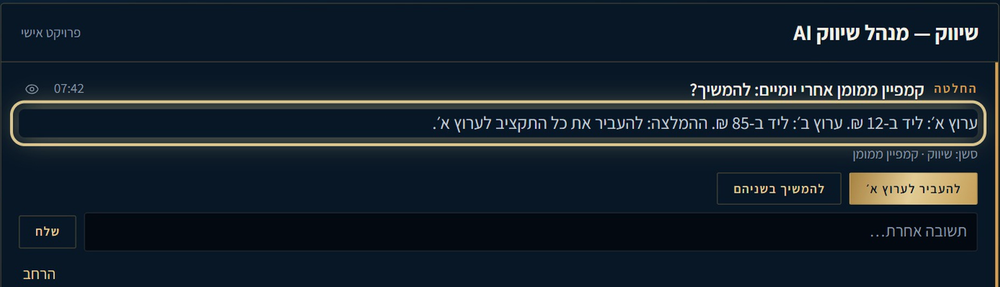
Each decision gets its options as buttons, with the agent's recommendation first. Your click goes straight back to the same session, and the agent carries on.
- 1. In the desk folder, paste the message below.
- 2. In one of your projects, ask the agent for a small test decision (for example, which of two titles to use).
- 3. Click a button on the desk.
Check it worked: It worked if the card disappears, and when you open that session you see your answer and the agent's next step.
NoteThe answer runs in the background, so an agent that needs your OK for a tool will get stuck. Give each project the permissions it needs ahead of time, in its own settings. Don't see the reply in a session that's already open in the Claude app? Close it and open it again.
Add answer buttons to every decision on the desk:
1. One button for each option in the "⚖️ Decision needed" block. The recommended option comes first and stands out.
2. A small box for a different answer in my own words.
3. On click, send the answer back to the same session with claude -p --resume <session id>, starting with "[Decision desk]". Run it from that session's project folder.
4. Never send to a session that is still running. Wait until it finishes.
5. Log every answer: when, which project, what I chose, and whether it arrived.
6. Remove the card once the answer has arrived.Add a status bar and a warning light
One line at the top tells you in a second how your morning looks. A warning light turns red when an answer didn't reach its agent, for example because the computer went to sleep.
- 1. Paste the message below in the desk folder.
- 2. Answer one decision and watch the numbers change.
- 3. From now on, open the desk every morning before anything else.
Check it worked: It worked if the counters match what you see in the list, and the light is green after your answer arrives.
The same desk works for a whole management team, with one rule for what each manager decides.
NoteKeep the desk on your own computer. Your clicks run real work in your projects, so never open it to the internet without a proper login in front of it.

Add a status bar at the top of the desk:
1. How many decisions are waiting, how many updates, how many agents are running now, and what percent I handled today.
2. Next to it a light: green when answers reach the agents, red when an answer failed or has waited more than 3 minutes, with a "Try again" button.
3. A short strip "Decided alone" that shows the last lines from each project's decisions-log.md, so I can see what the agents decided without me.