What you'll get
- Your approval rules rewritten as clear questions, with ready examples for the purchase order, the paying department and how complete the invoice is.
- A simple rule for which answers go straight through and which go to a person.
- A safe way to test: a made-up invoice to paste, and what Google's terms say about data you send for free.

Write down the rules you check today
The Gemini Decisions API is a new Google service. It reads a document, such as an invoice, and answers your questions with numbers instead of text. Start with the rules your finance team already checks by hand.
- 1. Ask whoever approves invoices to list every check they make, one per line.
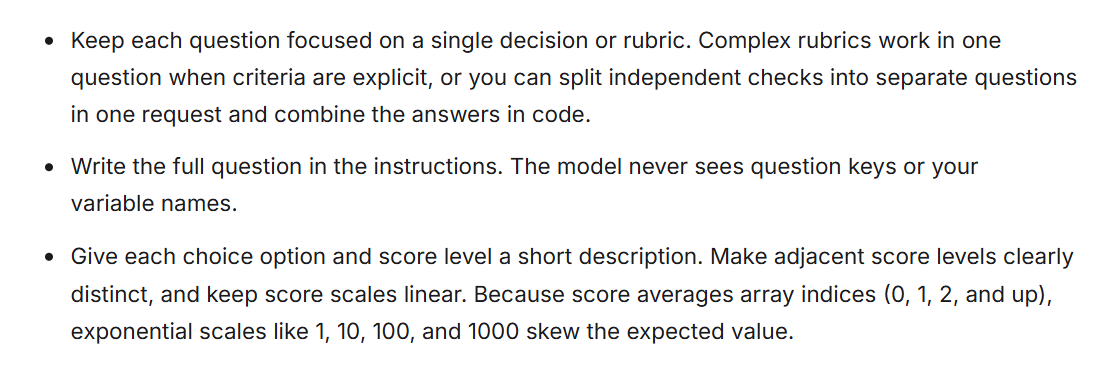
- 2. Split any rule that checks two things into two rules. Google advises keeping each question focused on a single decision.
- 3. Write each rule as a full question that someone could answer from the invoice alone.
Check it worked: It worked if every line is one short question and none of them needs your internal systems to answer.
NoteNumbers and dates are a special case. Google recommends comparing numbers, dates and durations in your own system and passing in the result. So "Is it over budget?" becomes a line your budget sheet adds above the invoice, as in step 2.
Rule we check today: Every invoice needs a purchase order.
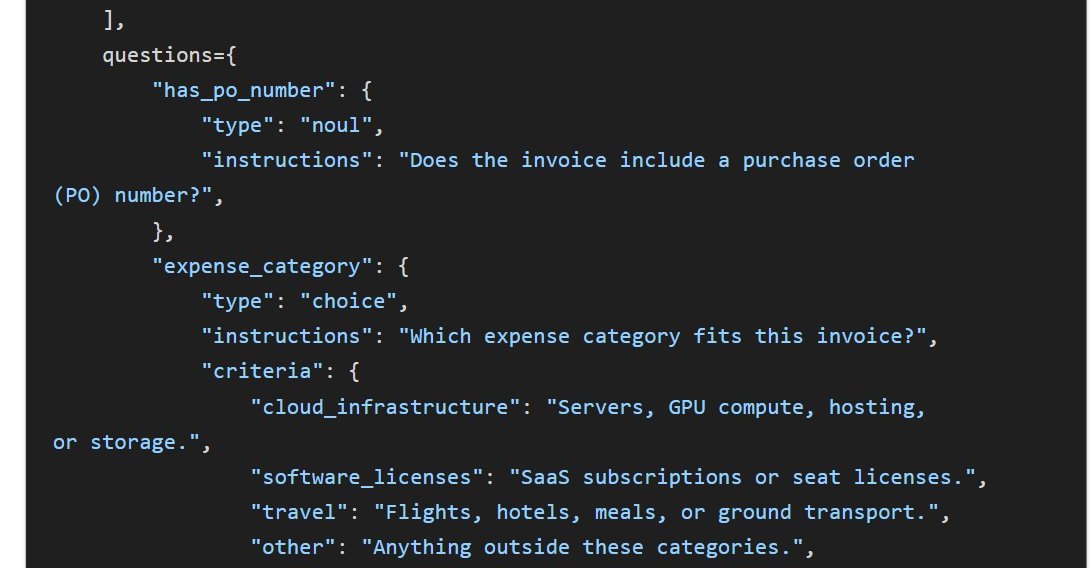
Question: Does the invoice include a purchase order (PO) number?
Question type: yes/no
If the answer is unsure: send to a person

Rule we check today:
Question:
Question type: yes/no, choice or score
If the answer is unsure:Turn yes/no rules into yes/no questions
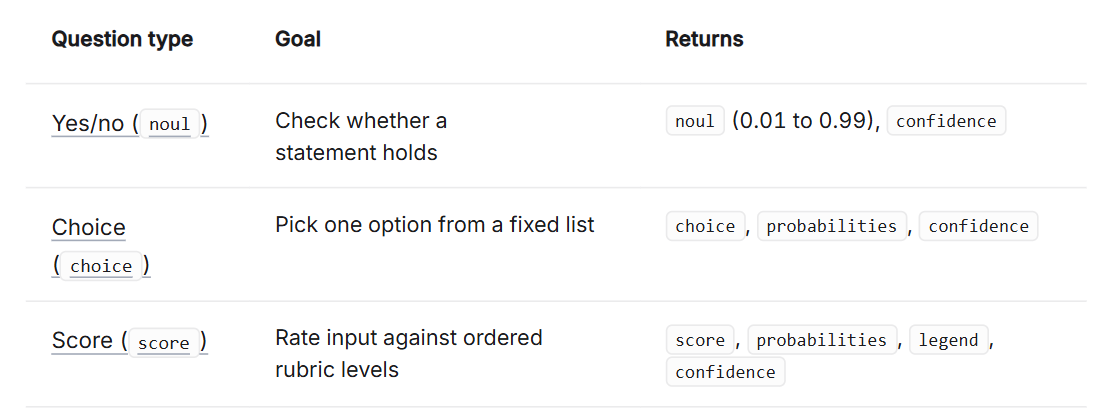
A yes/no question returns the chance that the answer is yes, between 0.01 and 0.99, plus a confidence score from 0 to 1. Google's own invoice example asks whether a purchase order number is there.
- 1. Take every rule from step 1 that has a yes or no answer.
- 2. Phrase it positively. Google suggests asking "Is the tier Gold?" rather than "Is the tier NOT Gold?".
- 3. For over budget, add one line from your budget sheet above the invoice text, and ask about that line.
Check it worked: It worked if each question can be answered from the invoice, plus the one budget line you added.
NoteFor a test, the budget line can be typed by hand, for example "Budget status: over budget". In real use your accounting system writes it.
Does the invoice include a purchase order (PO) number?
Is the invoice addressed to our company's registered name?
Does the invoice show the supplier's tax ID or VAT number?
Does the invoice show a due date?
Does the budget line above the invoice say the department is over budget?Use a choice question for who pays
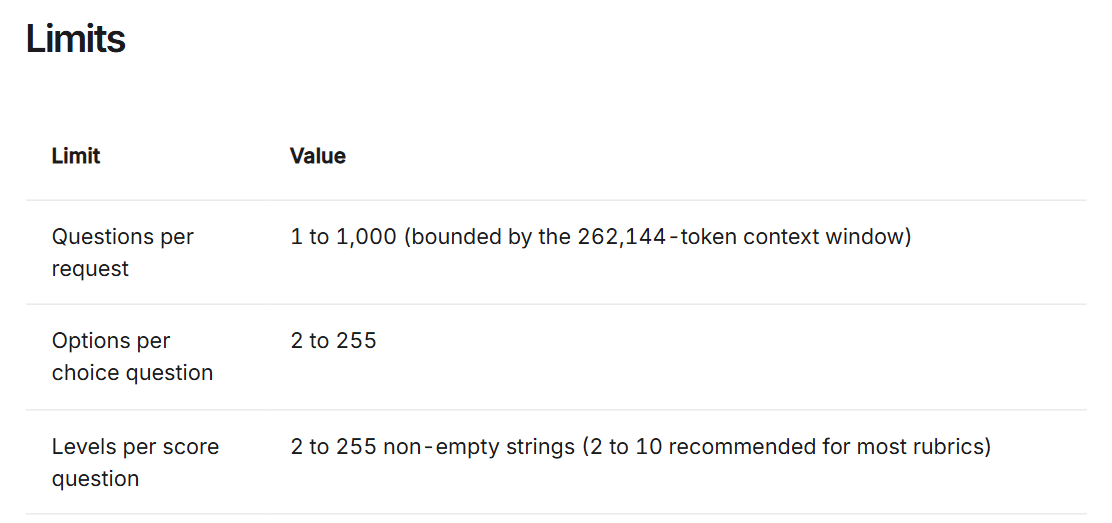
A choice question picks one option from a list you write, between 2 and 255 options, and gives a probability for each. Every option gets a short description, so the model knows when it applies.
- 1. List your departments, one per line, each with a short description of what it buys.
- 2. Add an option called other for anything that fits none of them. Google suggests the key "other" because it sorts options alphabetically.
- 3. Do the same for expense category if your team checks that too.
Check it worked: It worked if a colleague reading your descriptions would pick the same department for a sample invoice.
NoteThe option keys on the left stay as short English words, the way Google's examples write them. The descriptions after them can be in plain language.
Question: Which department should pay for this invoice?
Options:
finance: Accounting software, audit fees, bank charges.
it: Laptops, software licences, cloud hosting.
marketing: Ads, events, printing, agencies.
operations: Office rent, cleaning, supplies, maintenance.
other: Anything outside these departments.Score how complete the invoice is
A score question rates the input on levels you define, from lowest to highest. Google recommends 2 to 10 levels for most scales, each clearly different from the next.
- 1. Pick one thing your team judges by eye, such as how complete an invoice is.
- 2. Write 3 or 4 levels, from worst to best, one short line each.
- 3. Keep the steps even. Google warns that uneven scales such as 1, 10, 100 skew the result.
Check it worked: It worked if two people on your team would put the same sample invoice on the same level.
NoteThe answer is an average across the levels, so it can land between two of them, for example 1.4. Google suggests also looking at the probability of each level when an invoice falls in between.
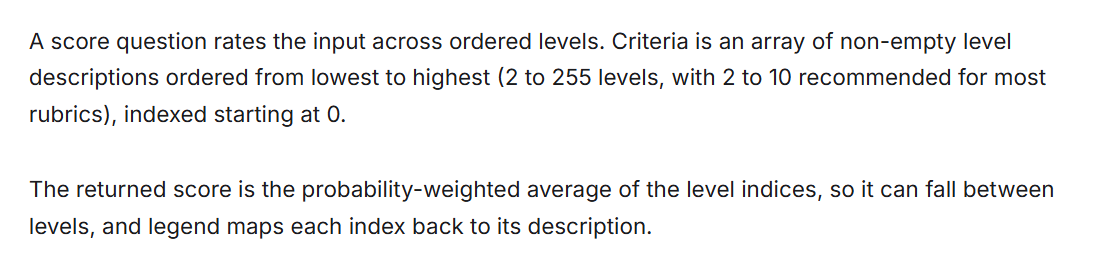
Question: How complete is this invoice for approval?
Levels, from lowest to highest:
0: Missing the supplier name or the total.
1: Has the supplier and total, but no invoice number or date.
2: Has the supplier, total, invoice number and date, but no PO number.
3: Has everything, including the PO number and payment details.Low confidence goes to a person
Every answer comes with a confidence score from 0 to 1, Google's estimate that the top answer is right. Use it to decide which invoices move on by themselves.
- 1. Pick a starting line for confidence, for example 0.7, the number in Google's own example.
- 2. Above the line, the invoice moves on with the answer. Below it, a person checks it.
- 3. Keep a person on every payment above a sum you choose, whatever the confidence. Google advises a human or a second check on high-stakes actions such as payouts.
Check it worked: It worked if, for each question, you can say what happens on high confidence and what happens on low confidence.
NoteSet the line from your own past invoices, not a guess: Google says to use labeled examples and weigh the cost of a wrong yes against a wrong no. Google also warns that text inside a document can argue for its own approval, so treat what the invoice says as untrusted.
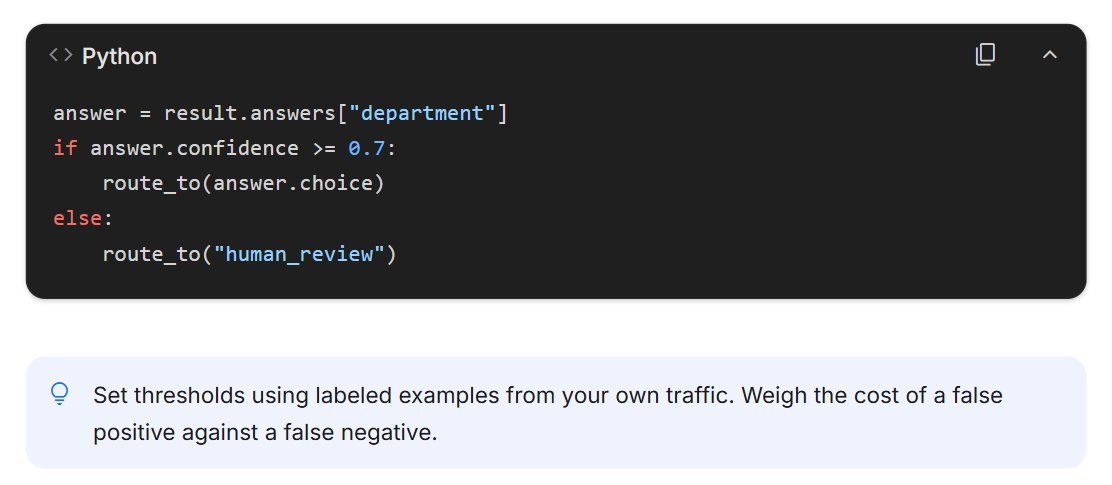
For each question:
- Confidence 0.7 or higher: use the answer and move the invoice on.
- Confidence under 0.7: send the invoice to a person, with the question that was unsure.
- Any invoice over [your amount]: a person approves it, whatever the answers say.Test on a made-up invoice, safely
Google's Decisions Playground in Google AI Studio lets you try yes/no, choice and score questions on your own text and files, then export the code. You need a Google account.
- 1. Open the Decisions API docs and follow the Decisions Playground link under What's next. Sign in with Google.
- 2. On a first visit, AI Studio shows a welcome window. Read it: pressing Continue accepts Google's terms.
- 3. Paste the sample invoice below as the input, add your questions from steps 2 to 4 and run them. Button names may differ, so follow your screen.
Check it worked: It worked if every question returns a number with a confidence. The PO question should lean strongly to yes, because the sample has a PO number.
Once it works on samples, the next step is the place where your invoices really arrive, with billing on and a person on the unsure queue.
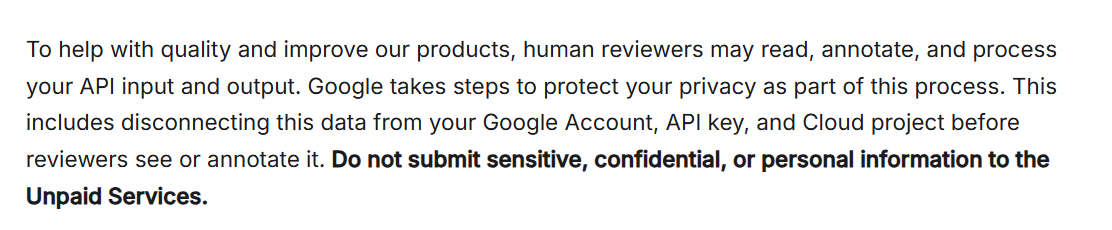
NoteFree use means Google may use what you send. Google's terms say content sent on the free tier helps improve its products, human reviewers may read it, and you should not submit sensitive, confidential or personal information. The API counts as paid only through a Cloud project with an active billing account (then $0.10 per million input tokens, nothing for output). So use made-up invoices until billing is on.
Budget status: within budget

INVOICE
Supplier: Example Office Supplies Ltd
Supplier tax ID: 000000000
Bill to: Your Company Ltd
Invoice number: 1042
Invoice date: 2026-11-10
Due date: 2026-12-10
Purchase order: PO-2291

20 boxes of A4 paper: 400.00
6 toner cartridges: 720.00
Subtotal: 1,120.00
VAT 18%: 201.60
Total: 1,321.60